> ## Documentation Index
> Fetch the complete documentation index at: https://starforge.mintlify.site/llms.txt
> Use this file to discover all available pages before exploring further.
# Admin Pages
> User quotas, hardware registry, schedule windows, Rubrics, audit, and usage
Requires the admin role. For CLI equivalents, see [sf admin](/en/cli/admin).
## Users and quotas (/admin)
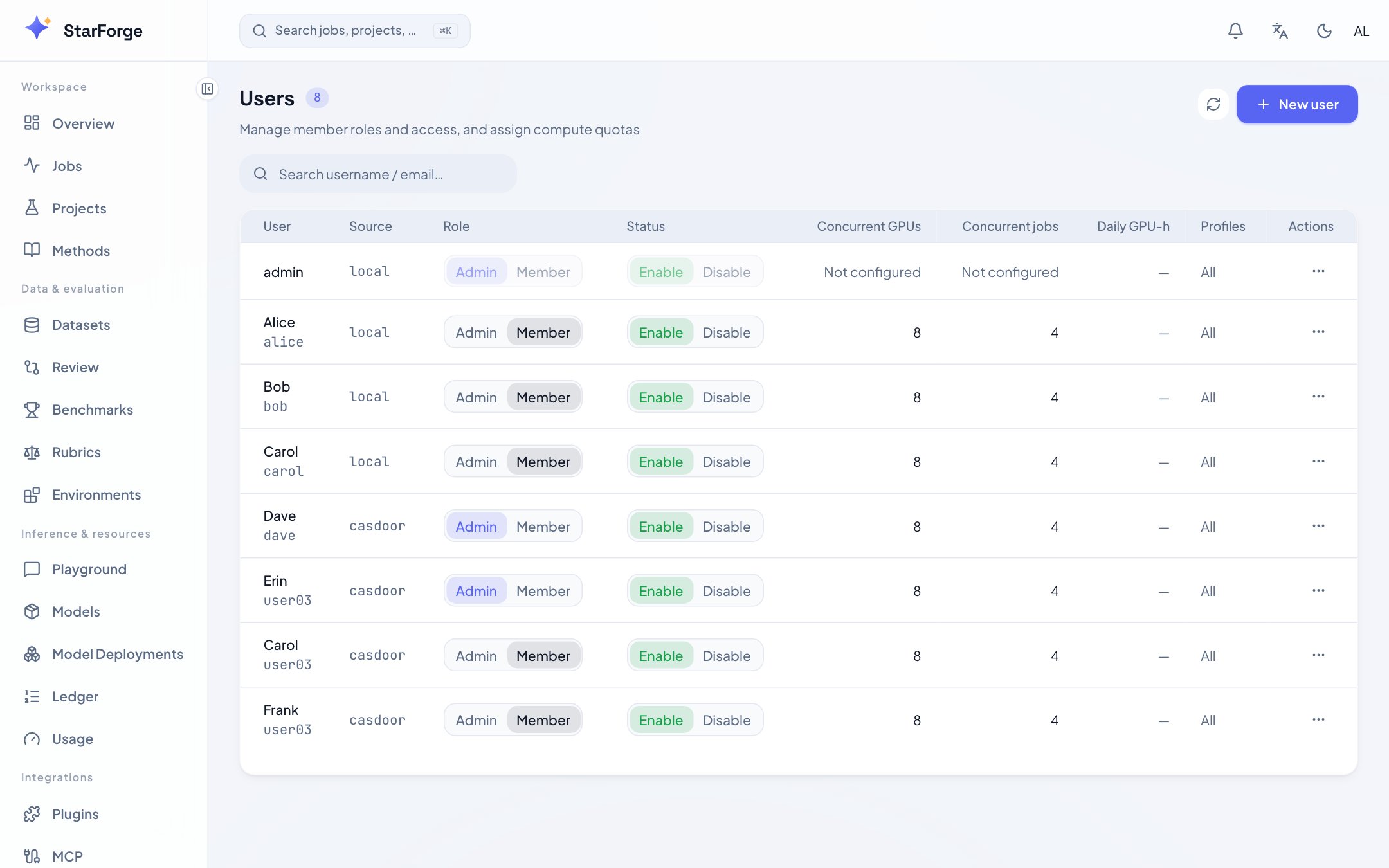
* User list: role, status, current usage;
* Create local accounts, change roles (admin / operator), disable / enable, delete;
* Per-user quotas: concurrent GPUs, concurrent jobs, daily GPU-hours, allowed profiles, queue priority;
* **Rubrics card**: versioned CRUD for LLM-judge scoring rule templates, referenced by the [judge service](/en/guides/agent-envs).
### Concurrency quota and daily budget are two different things
| | Governs | What happens when exceeded |
| ---------------------- | ------------------------------ | ---------------------------------------------------------------------------------- |
| Concurrent GPUs / jobs | How much you can hold at once | Submission is **rejected** (queuing would not help) |
| Daily GPU-hours | How much you can burn in a day | The job **queues**, and dequeues automatically after the budget resets at midnight |
With only a concurrency quota, one person running 8 GPUs all day and one running them for ten
minutes look equally compliant to the platform — while the bill differs by 140×. Set 0 for unlimited.
The number the gate reads is the same one the usage page shows (integrated over the platform's local
day, including the elapsed portion of running jobs), so "today's budget is used up" can be checked
against the user's own usage page.
Both respect the `FORGE_QUOTA_ENFORCE` master switch; with it off, they display but do not block.
### Dequeue order: first come first served, or fairness first
```bash theme={"theme":{"light":"github-light","dark":"github-dark-dimmed"}}
FORGE_SCHED_POLICY: "fair-share" # default: priority-fifo
FORGE_FAIRSHARE_WINDOW_H: 24 # look-back window in hours
```
`priority-fifo` (default) sorts by priority then submission time. Fine for a single team.
`fair-share` puts recently-lighter users first **within the same priority**. An explicitly granted
priority still wins — fairness should not override a decision. It compares **relative** usage
(recent GPU-hours ÷ quota GPUs): 100 GPU-hours from someone with a 64-GPU quota is not the same as
100 GPU-hours from someone with 8.
When to switch: **more than three teams sharing one cluster**. Before that, first-come-first-served
is easier to predict; after it, one person submitting 20 jobs within quota fills the queue, and that
becomes an interpersonal problem blamed on the platform.
 ## Platform settings (/admin/settings)
Registry management for GPU series (compute weight, memory, Ray pin, Slurm constraint, total GPU count) and profiles (shape + tuning overrides). Changes take effect hot (each instance pulls on its refresh interval).
Per-series daily run windows and enforcement switches: no dequeuing outside the window, running jobs paused after a grace period (checkpoint preserved), automatic resume when the window opens.
Deployment-level settings such as Playground availability scope, plugin governance switches, and diagnostics model configuration.
## Audit (/admin/audit)
Audit trail of all sensitive operations: who changed quotas / roles / the hardware registry and when, whose job was stopped, which plugin was published or disabled. Filterable by actor / type / time.
## Usage (/usage)
GPU-hour statistics: aggregated by user / GPU series / day, with daily reports generated automatically. This is the basis for quota adjustments.
## Maintenance mode
The maintenance switch at the top of the admin page = `sf admin maintenance drain/resume`: drain the cluster (jobs paused, checkpoints preserved) → upgrade → resume (training auto-continues). The status page shows whether the cluster is safe to restart.
## Platform settings (/admin/settings)
Registry management for GPU series (compute weight, memory, Ray pin, Slurm constraint, total GPU count) and profiles (shape + tuning overrides). Changes take effect hot (each instance pulls on its refresh interval).
Per-series daily run windows and enforcement switches: no dequeuing outside the window, running jobs paused after a grace period (checkpoint preserved), automatic resume when the window opens.
Deployment-level settings such as Playground availability scope, plugin governance switches, and diagnostics model configuration.
## Audit (/admin/audit)
Audit trail of all sensitive operations: who changed quotas / roles / the hardware registry and when, whose job was stopped, which plugin was published or disabled. Filterable by actor / type / time.
## Usage (/usage)
GPU-hour statistics: aggregated by user / GPU series / day, with daily reports generated automatically. This is the basis for quota adjustments.
## Maintenance mode
The maintenance switch at the top of the admin page = `sf admin maintenance drain/resume`: drain the cluster (jobs paused, checkpoints preserved) → upgrade → resume (training auto-continues). The status page shows whether the cluster is safe to restart.