> ## Documentation Index
> Fetch the complete documentation index at: https://starforge.mintlify.site/llms.txt
> Use this file to discover all available pages before exploring further.
# MCP access
> Let Cursor, Claude or Codex read your job configs, metrics and logs.
MCP exposes job data to an AI client so you can ask about a run where you are already working,
instead of copying log excerpts into a chat window.
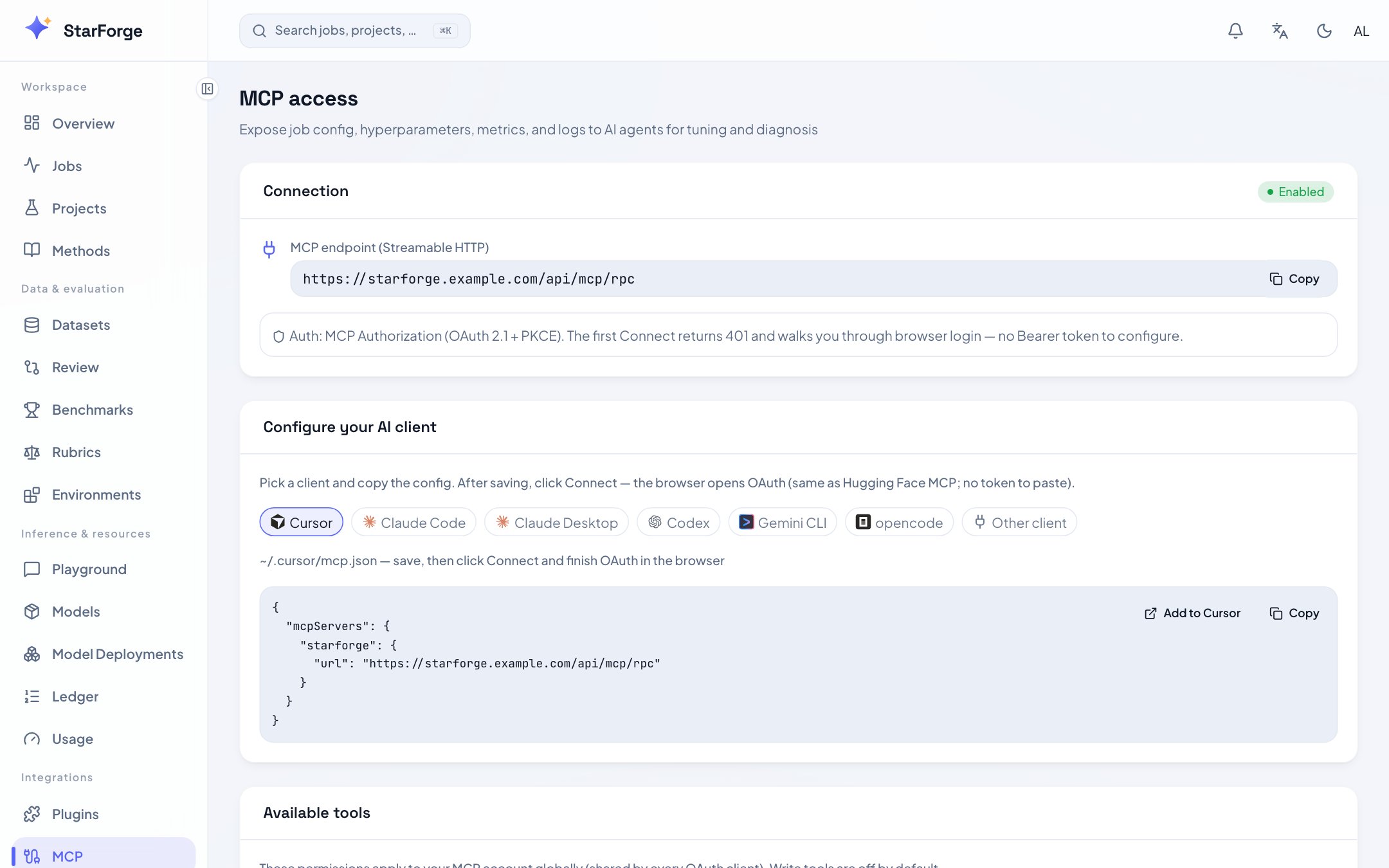 ## What you see
| Region | What it shows |
| ------------------------- | ----------------------------------------------------------------------------- |
| **Connection** | The MCP endpoint, over Streamable HTTP |
| **Configure your client** | Ready-to-paste configuration for Cursor, Claude Desktop, Claude Code or Codex |
| **Available tools** | Which tools your account permits, as a set of switches |
## Connecting
The page generates the right configuration for each: Cursor writes `~/.cursor/mcp.json`, Claude
Desktop goes through `mcp-remote`, Claude Code and Codex are added from the command line.
Authentication is OAuth 2.1 with PKCE. The first connection opens a browser to authorise; after
that the client holds a token.
Tools cover job configuration, hyperparameters, metrics and logs.
Tool permissions apply to your MCP account globally — every client you connect shares them. Turning
a tool off here turns it off everywhere.
## What is exposed, and what is not
Read tools are the default. Write tools are off unless you enable them, and a deployment can restrict
MCP to administrators entirely with `FORGE_PREMIUM_PUBLIC`.
An MCP client sees what your account can see — no more. It is not a way around dataset governance: a
protected dataset's records are not readable through the console, so they are not readable here
either.
A deployment running with authentication disabled skips OAuth entirely. That is for local
development, and the page says so when it applies.
## What you see
| Region | What it shows |
| ------------------------- | ----------------------------------------------------------------------------- |
| **Connection** | The MCP endpoint, over Streamable HTTP |
| **Configure your client** | Ready-to-paste configuration for Cursor, Claude Desktop, Claude Code or Codex |
| **Available tools** | Which tools your account permits, as a set of switches |
## Connecting
The page generates the right configuration for each: Cursor writes `~/.cursor/mcp.json`, Claude
Desktop goes through `mcp-remote`, Claude Code and Codex are added from the command line.
Authentication is OAuth 2.1 with PKCE. The first connection opens a browser to authorise; after
that the client holds a token.
Tools cover job configuration, hyperparameters, metrics and logs.
Tool permissions apply to your MCP account globally — every client you connect shares them. Turning
a tool off here turns it off everywhere.
## What is exposed, and what is not
Read tools are the default. Write tools are off unless you enable them, and a deployment can restrict
MCP to administrators entirely with `FORGE_PREMIUM_PUBLIC`.
An MCP client sees what your account can see — no more. It is not a way around dataset governance: a
protected dataset's records are not readable through the console, so they are not readable here
either.
A deployment running with authentication disabled skips OAuth entirely. That is for local
development, and the page says so when it applies.