> ## Documentation Index
> Fetch the complete documentation index at: https://starforge.mintlify.site/llms.txt
> Use this file to discover all available pages before exploring further.
# The web console
> What each screen is for, and which ones you will actually use.
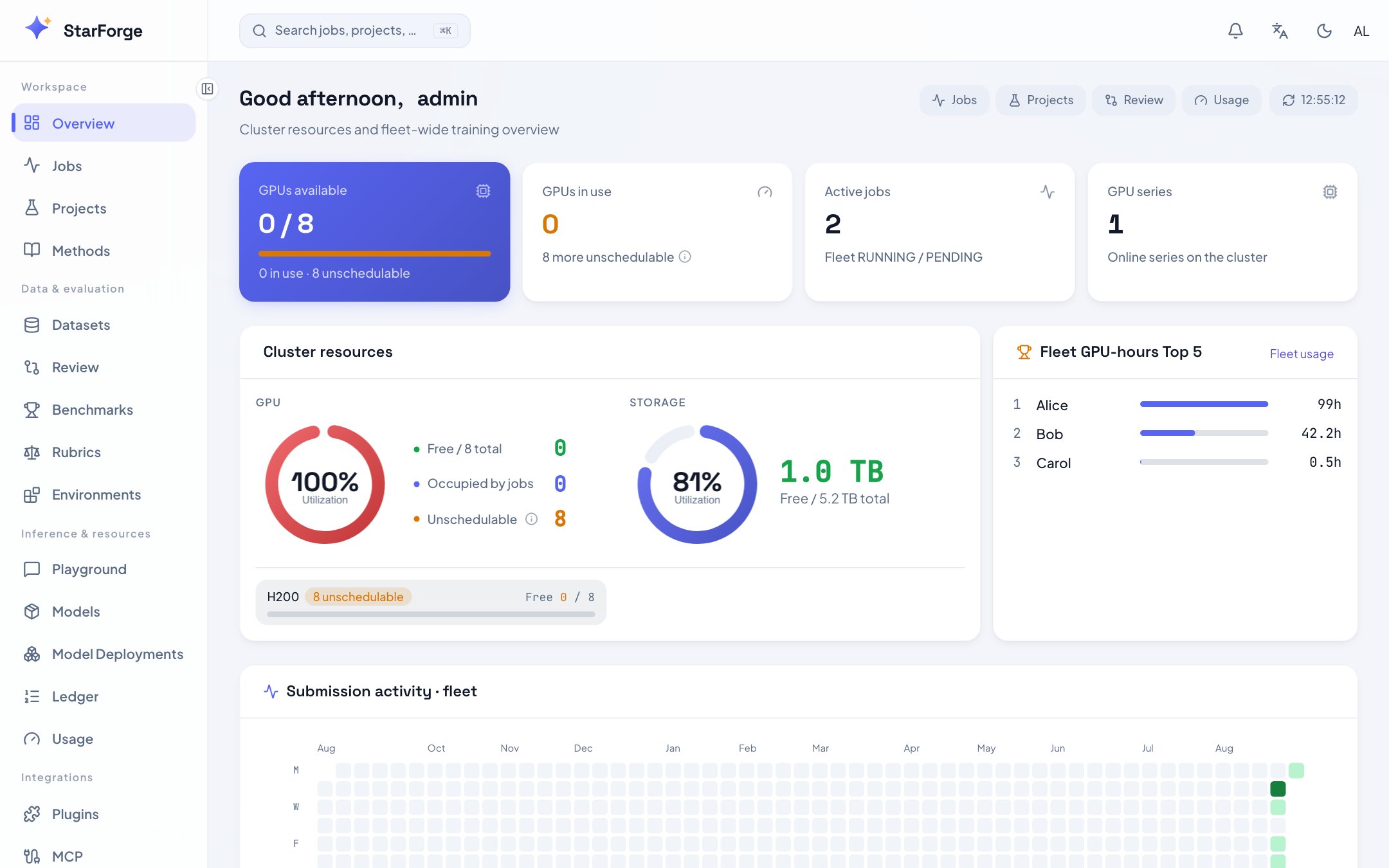
The console is where you watch work, compare results and govern the platform. Submitting still
happens from `sf` — both talk to the same API, so nothing is console-only by accident.
 ## Every screen
| Screen | Path | What it is for |
| -------------------------------------------- | ------------------ | -------------------------------------------------------------- |
| [Dashboard](/en/console/dashboard) | `/` | Cluster watermark, your quota, active jobs, recent submissions |
| [Jobs](/en/console/jobs) | `/jobs` | The job list, with filters and bulk actions |
| [Job detail](/en/console/job-detail) | `/jobs/:id` | Charts, logs, validation, system, config, artifacts, diagnosis |
| [Review](/en/console/review) | `/review` | Overlay several runs and decide which one to keep |
| [Runs](/en/console/runs) | `/runs` | The submission ledger, time-ordered |
| [Projects](/en/console/projects) | `/projects` | Runs grouped by repository, with project memory |
| [Benchmarks](/en/console/benchmarks) | `/benchmarks` | The score matrix across runs and benchmarks |
| [Rubrics](/en/console/rubrics) | `/rubrics` | Written scoring standards, their versions and usage |
| [Environments](/en/console/environments) | `/environments` | Agent RL environments and what each declares |
| [Playground](/en/console/playground) | `/playground` | Chat with a checkpoint, and A/B two of them |
| [Models](/en/console/models) | `/models` | The registry: versions, promotion, acceptance cards |
| [Deployments](/en/console/model-deployments) | `/deployments` | Managed serving, revisions, tokens, Reflow |
| [Methods](/en/console/methods) | `/methods` | The method catalog and every tunable hyperparameter |
| [Data](/en/console/datasets) | `/data` | Datasets and volumes: versions, file manifests, data quality |
| [Plugins](/en/console/plugins) | `/plugins` | The extension shelf, and admin governance |
| [Usage](/en/console/usage) | `/usage` | Your quota, GPU-hours, and cost attribution |
| [MCP](/en/console/mcp) | `/mcp` | Connect Cursor or Claude to your job data |
| [Integrations](/en/console/integrations) | `/integrations/hf` | Link a Hugging Face account |
| [Profile](/en/console/profile) | `/profile` | Display name, password, signed-in devices |
| [Notifications](/en/console/notifications) | bell icon | Your message feed |
| [Sharing](/en/console/sharing) | — | Read-only public links to a job or a review |
| [Tutorial](/en/console/tutorial) | `/tutorial` | The in-product onboarding walkthrough |
Administrators additionally get these, behind the **Administration** entry at the bottom of the sidebar — opening it replaces the sidebar with the admin navigation:
| Screen | Path | What it is for |
| ------------------------------------------ | ----------------- | -------------------------------------------------------------- |
| [Users and quotas](/en/console/admin) | `/admin/users` | Accounts, roles, GPU and storage quotas |
| [Settings](/en/console/admin-settings) | `/admin/settings` | Platform switches, images, hardware registry, schedule windows |
| [Scheduled tasks](/en/console/admin-tasks) | `/admin/tasks` | Background worker schedules and run history |
| [Audit](/en/console/audit) | `/admin/audit` | Who submitted, who was denied, who changed what |
## Two things worth knowing early
⌘K opens a search palette over jobs, runs, datasets and models. It is usually faster than
navigating.
AI diagnosis, Ask Agent and MCP show a locked card when the deployment restricts them to
administrators. `FORGE_PREMIUM_PUBLIC` opens them to everyone.
## Every screen
| Screen | Path | What it is for |
| -------------------------------------------- | ------------------ | -------------------------------------------------------------- |
| [Dashboard](/en/console/dashboard) | `/` | Cluster watermark, your quota, active jobs, recent submissions |
| [Jobs](/en/console/jobs) | `/jobs` | The job list, with filters and bulk actions |
| [Job detail](/en/console/job-detail) | `/jobs/:id` | Charts, logs, validation, system, config, artifacts, diagnosis |
| [Review](/en/console/review) | `/review` | Overlay several runs and decide which one to keep |
| [Runs](/en/console/runs) | `/runs` | The submission ledger, time-ordered |
| [Projects](/en/console/projects) | `/projects` | Runs grouped by repository, with project memory |
| [Benchmarks](/en/console/benchmarks) | `/benchmarks` | The score matrix across runs and benchmarks |
| [Rubrics](/en/console/rubrics) | `/rubrics` | Written scoring standards, their versions and usage |
| [Environments](/en/console/environments) | `/environments` | Agent RL environments and what each declares |
| [Playground](/en/console/playground) | `/playground` | Chat with a checkpoint, and A/B two of them |
| [Models](/en/console/models) | `/models` | The registry: versions, promotion, acceptance cards |
| [Deployments](/en/console/model-deployments) | `/deployments` | Managed serving, revisions, tokens, Reflow |
| [Methods](/en/console/methods) | `/methods` | The method catalog and every tunable hyperparameter |
| [Data](/en/console/datasets) | `/data` | Datasets and volumes: versions, file manifests, data quality |
| [Plugins](/en/console/plugins) | `/plugins` | The extension shelf, and admin governance |
| [Usage](/en/console/usage) | `/usage` | Your quota, GPU-hours, and cost attribution |
| [MCP](/en/console/mcp) | `/mcp` | Connect Cursor or Claude to your job data |
| [Integrations](/en/console/integrations) | `/integrations/hf` | Link a Hugging Face account |
| [Profile](/en/console/profile) | `/profile` | Display name, password, signed-in devices |
| [Notifications](/en/console/notifications) | bell icon | Your message feed |
| [Sharing](/en/console/sharing) | — | Read-only public links to a job or a review |
| [Tutorial](/en/console/tutorial) | `/tutorial` | The in-product onboarding walkthrough |
Administrators additionally get these, behind the **Administration** entry at the bottom of the sidebar — opening it replaces the sidebar with the admin navigation:
| Screen | Path | What it is for |
| ------------------------------------------ | ----------------- | -------------------------------------------------------------- |
| [Users and quotas](/en/console/admin) | `/admin/users` | Accounts, roles, GPU and storage quotas |
| [Settings](/en/console/admin-settings) | `/admin/settings` | Platform switches, images, hardware registry, schedule windows |
| [Scheduled tasks](/en/console/admin-tasks) | `/admin/tasks` | Background worker schedules and run history |
| [Audit](/en/console/audit) | `/admin/audit` | Who submitted, who was denied, who changed what |
## Two things worth knowing early
⌘K opens a search palette over jobs, runs, datasets and models. It is usually faster than
navigating.
AI diagnosis, Ask Agent and MCP show a locked card when the deployment restricts them to
administrators. `FORGE_PREMIUM_PUBLIC` opens them to everyone.