> ## Documentation Index
> Fetch the complete documentation index at: https://starforge.mintlify.site/llms.txt
> Use this file to discover all available pages before exploring further.
# Quickstart
> Install the CLI, submit a GRPO job, and see the first point land on the loss curve.
Fifteen minutes from nothing to a training run you can watch. The path below is deterministic:
copy it and it runs.
## Before you start
An administrator creates it, or your deployment uses single sign-on. You also need the console
URL.
`sf status` prints both after you log in. Every profile name on this site — `h200:8` and friends —
is an example; use the ones your own `sf status` prints.
The scaffold trains `Qwen/Qwen2.5-1.5B` and pulls it from Hugging Face when the job starts. On an
air-gapped network an administrator points the deployment at an internal mirror; see
[air-gapped deployments](/en/ops/airgapped). Without it the job starts, stalls at downloading
weights, and eventually times out.
Only needed for `sf dataset push` and for automatic evaluation after training. This path works
without it.
```bash theme={"theme":{"light":"github-light","dark":"github-dark-dimmed"}}
uv tool install starforge-core # or: pip install starforge-core
sf init my-lab --yes
cd my-lab
```
Do not clone the platform repository — `sf init` is what creates your project. See
[`sf init`](/en/cli/init) for what it puts on disk. Later, upgrade with
[`sf update`](/en/cli/update) rather than reinstalling by hand.
```bash theme={"theme":{"light":"github-light","dark":"github-dark-dimmed"}}
sf login --server https://starforge.your-company.com
```
Opens a browser. On an SSH session add `--device-flow`; in CI pass `--token`. Credentials land
in `~/.forge/`.
```bash theme={"theme":{"light":"github-light","dark":"github-dark-dimmed"}}
sf status
```
Prints your account, your quota, and the profile names this deployment actually has. Note them —
the next step needs one.
 ```bash theme={"theme":{"light":"github-light","dark":"github-dark-dimmed"}}
sf new my-grpo --method nemo-rl/grpo
```
Writes `experiments/my-grpo/` with `config.yaml`, `README.md` and `recipe.lock.json`.
```bash theme={"theme":{"light":"github-light","dark":"github-dark-dimmed"}}
sf methods # every method this deployment offers
sf methods nemo-rl/grpo # what you can tune, with ranges and defaults
```
Edit `experiments/my-grpo/config.yaml`. The keys people change most often — learning rate, batch
size, sequence length — are at the top of the scaffold.
```bash theme={"theme":{"light":"github-light","dark":"github-dark-dimmed"}}
sf validate my-grpo
```
Checks types, ranges and batch-size divisibility against the method declaration. A typo fails
here, in seconds, instead of after a queue wait.
```bash theme={"theme":{"light":"github-light","dark":"github-dark-dimmed"}}
git add -A && git commit -m "first grpo run"
sf submit my-grpo --profile h200:8
```
Prints a job id. `--profile` is the only resource flag: `h200` takes the registry default shape,
`h200:4` asks for four GPUs, `h200:16` for two full nodes.
A dirty working tree is refused unless you pass `--allow-dirty`, so a result stays traceable to
an exact commit.
```bash theme={"theme":{"light":"github-light","dark":"github-dark-dimmed"}}
sf job logs # omit the id to follow the latest job
```
Status moves `QUEUED` → `SUBMITTED` → `PENDING` → `RUNNING`. Queued means admitted but not yet
on the cluster — see [job states](/en/concepts/job-lifecycle).
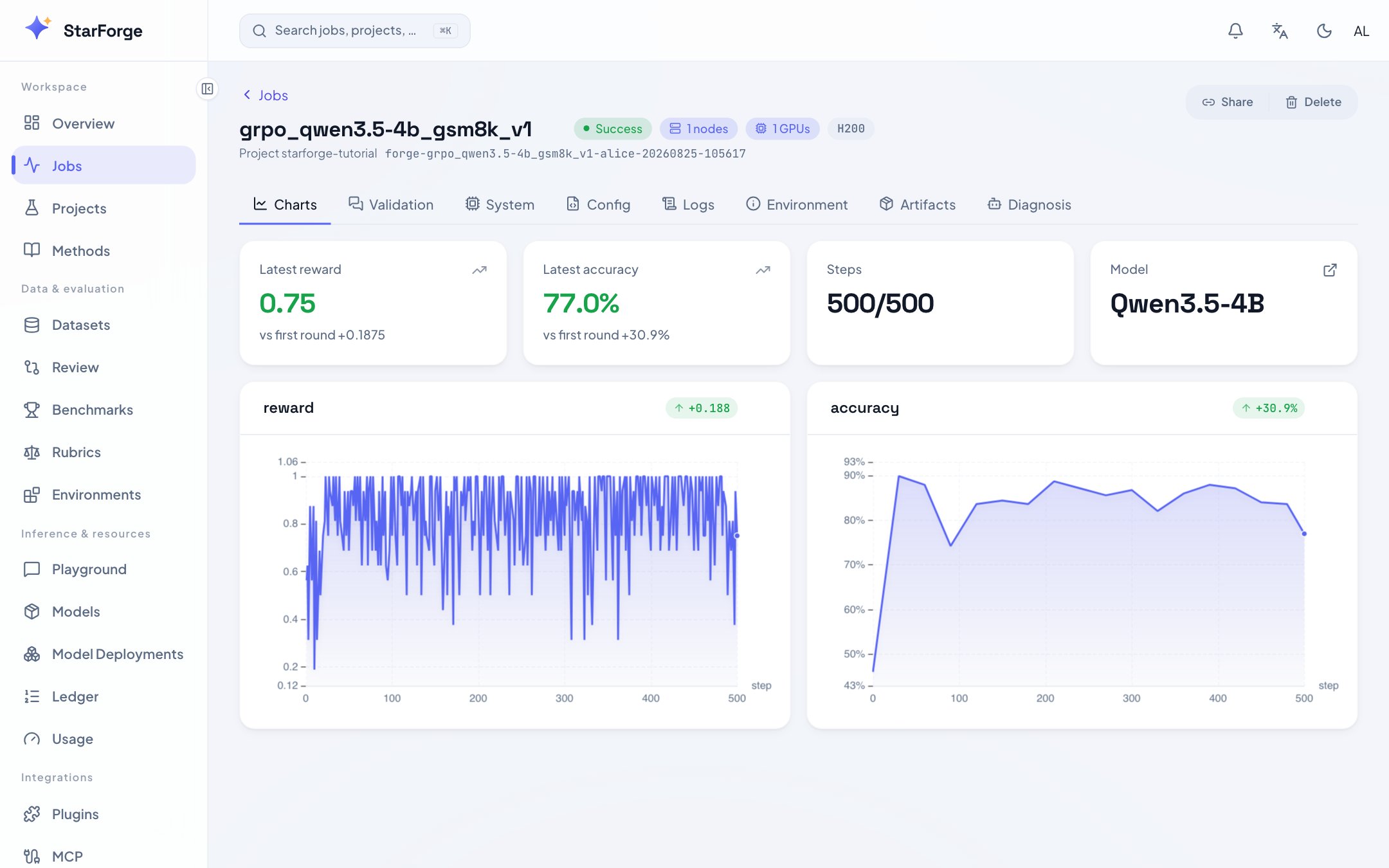
Open the console, go to **Jobs**, and click into yours.
| Tab | What it shows |
| ----------- | ----------------------------------------------------------------- |
| Charts | Loss, reward, KL, gradient norm, step by step |
| Logs | The full stream, searchable and downloadable |
| Validation | Sample conversations and reward histograms |
| System | GPU utilisation, memory, network |
| Diagnostics | On a failure or an odd curve, a report and the knobs worth trying |
```bash theme={"theme":{"light":"github-light","dark":"github-dark-dimmed"}}
sf new my-grpo --method nemo-rl/grpo
```
Writes `experiments/my-grpo/` with `config.yaml`, `README.md` and `recipe.lock.json`.
```bash theme={"theme":{"light":"github-light","dark":"github-dark-dimmed"}}
sf methods # every method this deployment offers
sf methods nemo-rl/grpo # what you can tune, with ranges and defaults
```
Edit `experiments/my-grpo/config.yaml`. The keys people change most often — learning rate, batch
size, sequence length — are at the top of the scaffold.
```bash theme={"theme":{"light":"github-light","dark":"github-dark-dimmed"}}
sf validate my-grpo
```
Checks types, ranges and batch-size divisibility against the method declaration. A typo fails
here, in seconds, instead of after a queue wait.
```bash theme={"theme":{"light":"github-light","dark":"github-dark-dimmed"}}
git add -A && git commit -m "first grpo run"
sf submit my-grpo --profile h200:8
```
Prints a job id. `--profile` is the only resource flag: `h200` takes the registry default shape,
`h200:4` asks for four GPUs, `h200:16` for two full nodes.
A dirty working tree is refused unless you pass `--allow-dirty`, so a result stays traceable to
an exact commit.
```bash theme={"theme":{"light":"github-light","dark":"github-dark-dimmed"}}
sf job logs # omit the id to follow the latest job
```
Status moves `QUEUED` → `SUBMITTED` → `PENDING` → `RUNNING`. Queued means admitted but not yet
on the cluster — see [job states](/en/concepts/job-lifecycle).
Open the console, go to **Jobs**, and click into yours.
| Tab | What it shows |
| ----------- | ----------------------------------------------------------------- |
| Charts | Loss, reward, KL, gradient norm, step by step |
| Logs | The full stream, searchable and downloadable |
| Validation | Sample conversations and reward histograms |
| System | GPU utilisation, memory, network |
| Diagnostics | On a failure or an odd curve, a report and the knobs worth trying |
 ## Confirm it worked
Check these in order. If one does not match, stop there — every later step assumes the previous one
actually happened.
| When | What you should see | If it does not match |
| ----------------- | ---------------------------------------------------- | --------------------------------------------------------------------------------- |
| After `sf status` | Your username, your quota, at least one profile name | Login did not complete, or no quota has been granted |
| After `sf submit` | A job id, state `QUEUED` or `SUBMITTED` | A refusal names the gate that refused it — see [errors](/en/api-reference/errors) |
| 1–3 min | State turns `RUNNING` | Stuck in `QUEUED`: the job page names the gate holding it |
| 3–8 min | Logs show the weight download, then Ray starting | Stuck downloading: the mirror, see [air-gapped](/en/ops/airgapped) |
| 8–15 min | **The first point on the Charts tab** | Logs moving but charts empty: ingest, see below |
Once that first point appears, the path worked.
If the logs show training and the charts are still empty, the reporting call is not happening. For a
catalog method that is an ingest configuration problem; for your own trainer it usually means
`starforge.report` was never called. See [reporting](/en/api-reference/python-sdk).
## Next
Every flag on the submit path: resources, overrides, data, images, follow-on actions.
When the method you need is not in the catalog.
One command, many variants, grouped in the console.
Score the run against GSM8K, MMLU, C-Eval and the rest.
## Confirm it worked
Check these in order. If one does not match, stop there — every later step assumes the previous one
actually happened.
| When | What you should see | If it does not match |
| ----------------- | ---------------------------------------------------- | --------------------------------------------------------------------------------- |
| After `sf status` | Your username, your quota, at least one profile name | Login did not complete, or no quota has been granted |
| After `sf submit` | A job id, state `QUEUED` or `SUBMITTED` | A refusal names the gate that refused it — see [errors](/en/api-reference/errors) |
| 1–3 min | State turns `RUNNING` | Stuck in `QUEUED`: the job page names the gate holding it |
| 3–8 min | Logs show the weight download, then Ray starting | Stuck downloading: the mirror, see [air-gapped](/en/ops/airgapped) |
| 8–15 min | **The first point on the Charts tab** | Logs moving but charts empty: ingest, see below |
Once that first point appears, the path worked.
If the logs show training and the charts are still empty, the reporting call is not happening. For a
catalog method that is an ingest configuration problem; for your own trainer it usually means
`starforge.report` was never called. See [reporting](/en/api-reference/python-sdk).
## Next
Every flag on the submit path: resources, overrides, data, images, follow-on actions.
When the method you need is not in the catalog.
One command, many variants, grouped in the console.
Score the run against GSM8K, MMLU, C-Eval and the rest.